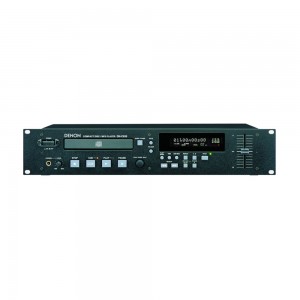
제품특징
충격방지 메모리 (약 10초)
즉시 재생 :재생 버튼을 누르면 음향이 즉시 재생됨
자동 큐 :음향이 처음으로 탐지되는 지점의 레벨은 -36에서 -48dB 사이에
서 조정할 수 있슴 (3단계)
재생 모드(연속,단일)와 종료 모드
CD-R/RW 재생 호환성
MP3 재생 :폴더/타이틀 검색,MP3에 대해 조정할 수 있는 ±12%재생 속
도,폴더 반복 재생
CD 텍스트
회전식 트랙 선택 노브 (손쉬운 트랙 선택)
조정이 가능한 XLR 활성 밸런스(Balanced)스테레오 출력(Output)
재생 속도 조정
프로그램 재생 (최대 99개 트랙까지)끝부분 모니터 (End Monitor)
연속 (재생)모드에서는 기기가 디스크의 마지막 트랙 끝부분을 재생함
(트랙)종료 메시지 (EOM)
전원을 켜는 순간 재생 작동
다음 트랙 역방향 재생
검색 정밀도 (1 프레임 =1/75초)(CD 한정)
직렬 (D-서브 9핀)(AMX/CRESTRON 호환 가능)
병렬 (D-서브 25핀)
페이더 시작
취침 기능
기능 프리세트
RC680 Remote
제품스팩
Key Features
Shock-Proof Memory (Approximately 10 Seconds)
Instant Start
When the PLAY button is pressed, audio starts instantly.
Auto Cue
After a track is selected, it is automatically cued to the point where audio starts rather than where the track starts. The level at which sound is first detected can be set between -36 and -48 dB (3 steps).
Play Mode and Finish Mode
1) Play mode
- Continuous: Play a whole disc.
- Single: Play a track.
2) Finish mode (Stop, Next, Recue)
This function is available when single or continuous playback is selected.
- Stop: Stop after a track or disc is finished playing.
- Next: Standby at the beginning of the next track after finishing the current track being played.
- Recue: After finishing the current track being played, standby at the point where you started playback.
CD-R/RW Playback Compatibility
MP3 Playback
- Folder/Title search
- ±12 Percent playback speed controllable on MP3
- Folder repeat playback
CD TEXT
Rotary Track Select Knob (Easy Track Selection)
Tracks can be selected quickly by turning the knob left or right. Pushing the knob in while turning will increment tracks by ten, making access to high number tracks fast and simple.
Adjustable XLR Active Balanced Stereo Output
Playback Speed Control
- The long stroke sliding fader adjusts the play speed of CDs or MP3 discs by ±12.0 percent in increments of 0.1 percent. This pitch control can be turned off for normal playback by pressing the pitch button.
- Pitch lock function: When pressing the pitch button again while pitch control mode is on and the pitch display is lit, you cannot change playback speed even if you move the sliding fader.
- Apart from pitch control on the front panel, playback speed can also be adjusted using a preset function that allows the speed to be increased by up to ±3.0 percent in increments of 0.2 percent. When this preset function is engaged, pitch control on the front panel is disabled.
Program Play (Maximum 99 Tracks)
- Three different programs can be stored in nonvolatile memory.
- The unit incorporates a memory function that boots the unit up automatically in the program mode when a programmed disc is inserted.
End Monitor
When this button is pressed while in standby mode, the end of the selected track is reviewed. The review duration can be preset between 5 and 35 seconds. While in continuous mode, the unit plays the final portion of the last track on the disc.
End of Message (EOM)
At the end of a track, the FL display flashes, providing a visual warning to the operator that the track will end shortly. The point at which the EOM warning begins can be preset within a range of 0 to 60 seconds, seven steps.
Power-On Playback
When the unit is powered up:
1) Play the entire disc from the first track of the disc
2) Play the program sequence from the beginning
Next-Track Reserve
Turning the track select knob during playback reserves the next track to be played back. After the current track has finished playing back, the unit continues by playing back the reserved track.
Search Accuracy (One Frame = 1/75 Second—CD Only)
RS-232 Serial Port AMX/CRESTRON compatible)
Parallel (D-Sub 25-Pin)
When connected to an external controller, the DN-C635 allows users to use play, pause, and conduct other simple functions easily by contact closure control.
Fader Start
The parallel remote (D-sub 25-pin) connector allows fader start operation from a mixing console. You can select fader start mode as follows:
Start Only - Player starts when fader switch is turned on.
Start, Pause - Player starts when fader switch is turned on; player pauses when fader switch is turned off.
Sleep Function
This function increases drive life by shutting down the servo systems of the transport if a button is not pressed within the time specified. The sleep time can be specified in the preset menu or defeated.
Function Preset
Three different function presets can be stored into a non-volatile memory via buttons operated on the front panel (“ * ” indicates the default setting).
| |
|
|
Preset Type |
1*/2/3 |
|
Finish Mode |
Stop/Next*/Recue |
|
Power On Mode |
Standby*/Play/Stop |
|
Auto Cue Level |
Off/–36/–42/–48* dB |
|
Sleep Mode |
Off/1/2/5/10/15/30* |
|
Program 1 |
Off*/On |
|
Program 2 |
Off*/On |
|
Program 3 |
Off*/On |
|
End Monitor |
Off/5/10*/15/20/25/30/35 sec. |
|
EOM |
Off/0/5/10*/15/20/30/60 sec. |
|
Next Stdby |
Off*/On |
|
Next Track Reserve |
Off*/On |
|
Playback Speed |
Normal*/–3.0 ~+3.0, 0.2% step/0 Fix |
|
Delay Start |
Off*/100/200/300 msec. |
|
Panel Lock |
Off*/On |
|
Play Lock |
Off*/On |
|
Eject Lock |
Off*/On |
|
Time Mode |
Elapsed/Remaining* |
|
Frame Display |
On*/Off |
|
Text Display |
Off*/On |
|
Parallel Inhibit |
Enable*/Inhibit |
|
Standby Tally Inhibit |
Enable*/Inhibit |
|
Tally Selection |
Index2*/Index3 |
|
Fader Start Mode |
Pause*/Play |
|
Serial Remote |
Off/RS232C*/RS422A |
|
Play Mode |
Single*/Continuous |
|
Cascade |
OFF*/ON |
|
IR Code |
DENON*/RC5 |
|
IR Remote |
OFF*/ON |
|
Output |
Stereo*/Mono |
|
Play List |
OFF*/ON |
|
Preset Clr |
Initialized |
Expanded Connection In/Out
1. Cascade Function (Figure 1)
The ports (CASCADE IN/OUT) of multiple DN-C635 units can be linked by cables to enable continuous relay playback among the units.
2. Synchronized Recording (Figure 2)
The port (EXT. SYNC OUT) of the DN-C635 unit can be linked to other Denon recorders (DN-780R and other models) by cables to enable simultaneous recording. (Up to 20 units can be connected for continuous recording of the source.)
Eight Times Oversampling Digital Filter
Display of Playback Locations
A bar graph display indicates playback points on the track being played. Elapsed time and remaining time displays are switched using the TIME button.
Mono Playback
When “MONO” is on in the preset menu, tracks recorded in stereo are output as a mix of L and R channels.
Next Track Standby
Pressing the STDBY/CUE button during play stops playback and makes the unit enter a standby at the beginning of the next track. This comes in handy in combination with the program function when determining tracks (numbers) to be played back.
Other Features
- Digital output (coaxial)
- Headphone jack with volume control
- FL display
- 20-track music calendar for CD playback
Specifications